Home / Complete guide to remote access
COMPLETE GUIDEComplete guide to remote access
for small businesses
A systematic introduction to connecting from outside the office to internal systems — from scratch. Covers approach differences, VPN risks, safe access by target, zero-trust design, operations, threat preparedness, and industry-specific examples. Start from the topic most relevant to you.
Note: the linked articles in each section are in Japanese. An English column section is in preparation.
What is remote access — and how do the approaches differ?
Start with the big picture. Approaches to connecting from outside the office to internal systems include VPN, Remote Desktop, and SASE/ZTNA — each with different strengths and weaknesses. Note also that UTM and firewalls serve a different role from remote access.
VPN risks and the "move beyond VPN" discussion
Common targets are VPN appliances with unpatched vulnerabilities or past EOL, and designs that expose the entire internal network after connection. "Moving beyond VPN" does not mean stopping VPN altogether — it means reviewing the risks and redesigning from the ground up.
Safe access from outside — by what you are connecting to
Internal PCs, files, cameras, personal devices, and hybrid cloud environments — each target has its own failure modes and safe patterns. The common thread is: do not expose directly to the internet, and allow only what is necessary.
- →How to use Remote Desktop (RDP) securely from outside the office (Japanese)
- →How to access NAS and file servers securely from outside the office (Japanese)
- →How to view security cameras (network cameras) safely from outside the office (Japanese)
- →Risks of connecting to internal systems from public Wi-Fi or on a business trip (Japanese)
- →Should personal PCs / BYOD be allowed to connect to internal systems? Criteria and restrictions (Japanese)
- →Internal systems remain even after moving to SaaS — hybrid environments (Japanese)
Design: zero trust and least privilege
Restricting how far a connected user can go is key to limiting the blast radius of a breach. Both the philosophy (zero trust) and the practical implementation (access control design) are covered here.
Operations: access management, logs, contractors, shared IDs
Security is not just setup and done. Revoking access promptly, keeping logs, not over-sharing — these operational practices underpin ongoing security. Focus areas: departing employees and contractors, log review, and eliminating shared IDs.
Preparing for threats — and the initial response when something happens
Ransomware and phishing target small businesses too. Hardening entry points, restricting post-connection reach, and having a pre-planned initial response helps limit the damage.
Getting started — frameworks, cost, and migration
Where to begin, the SECURITY ACTION framework, how to read pricing, migration practicalities, and personal data protection requirements — this section covers the before-and-after logistics of implementation.
- →Remote-work security: 10 things to check first (Japanese)
- →What is SECURITY ACTION? Basics to get right before enabling remote access (Japanese)
- →How to read VPN pricing for small businesses (Japanese)
- →How to choose a "drop-in VPN" or cloud-based VPN (Japanese)
- →Migration checklist for switching VPN or remote-access solutions (Japanese)
- →Personal data protection requirements and remote access (Japanese)
Remote access by industry
What to check varies depending on the type of information you handle and how your people work. Browse the industry-specific examples closest to your situation.
- →Remote work at accounting firms and law firms (Japanese)
- →Remote access at medical institutions (Safety Management Guidelines v6.0) (Japanese)
- →Remote work at care and welfare facilities (Japanese)
- →Remote work in construction and real estate (Japanese)
- →Remote work at small manufacturers (trade secrets) (Japanese)
Frequently asked questions
What is remote access?
An umbrella term for mechanisms that allow users outside the office — at home, off-site, or at another site — to connect to internal PCs, servers, NAS, and business systems while maintaining security. Multiple approaches exist: VPN, Remote Desktop (RDP), SASE/ZTNA, and managed products. The right choice depends on your infrastructure and operational requirements.
Which remote-access approach suits a small business?
There is no single "best" answer. The least error-prone approach is to evaluate based on: where your data lives (on-premises or cloud), your operational capacity (dedicated IT staff or not), supported operating systems, MFA requirements, and pricing transparency. When there is no dedicated IT person, managed solutions that handle initial setup and ongoing operations are a common candidate.
Is VPN dangerous?
VPN itself is not inherently dangerous. The real problem is "leaving appliance vulnerabilities unpatched or running EOL hardware" and "a design that exposes the entire internal LAN after connection." Applying patches consistently and restricting post-connection reach (least privilege) help reduce those risks.
Is it a problem if the entire internal network is visible after connecting?
Yes. If one device is compromised, an attacker can use it as a starting point to move laterally across the internal network and spread the impact. Permitting only the specific destinations each user needs — and not opening the entire internal LAN — narrows the range an attacker can move.
Does a small company need zero trust?
Zero trust does not mean a full-scale product overhaul. It can be adopted incrementally — starting with the parts that have the most impact: inventorying internal resources, restricting post-connection reach, eliminating shared IDs, and revoking access promptly when someone leaves.
What should we watch out for when migrating away from an existing VPN?
Key points: take an inventory of users, destinations, and permissions; prepare a phased cutover plan with a rollback procedure; and after migration, make sure the old connection paths (VPN ports, port forwarding, direct exposure) are definitively closed.
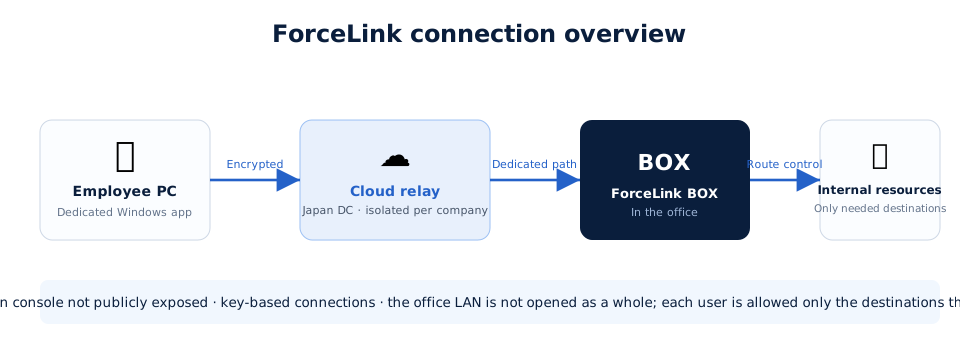
Wondering how this applies to your situation? Just ask.
Tell us your scale, connection targets, and the devices you use — we will outline the right configuration at no charge.