Rethinking "VPN is risky" —
by design.
ForceLink — place it, share a code, done.
Secure access to your office network, even while working remotely. Common weaknesses of legacy VPNs are addressed at the design level. Modern encryption, straightforward flat-rate pricing — no per-user fees, no confusing tiers.
Place it, share a code. ― Your team connects to the office, safely.
The right level of security for small-business remote work.
No complex infrastructure required. Secure, simple, and practical. Three core values that support your remote workforce.
Security by design
The admin console is not exposed to the internet. Each organization's network is isolated, and connections are key-based. With the standard Windows client, your key is generated and stays on the device — it never leaves.
Easy to get started
Cloud provisioning and ForceLink BOX initial configuration are handled by Forcenet. Customers start by placing the ForceLink BOX and distributing invite codes — nothing more.
Internal resource & route control
Even after connecting, users can't see your whole LAN. The ForceLink BOX controls which internal PCs, servers, and NAS each user can reach — limiting lateral movement risk if a device is ever compromised.
The right fit — not too little, not too much.
Addresses the weaknesses of legacy VPNs without the complexity and cost of a large-scale SASE deployment. A remote-access choice that is realistic to deploy and operate.
Traditional VPN
- Appliance exposed to the internet — a frequent target
- Password-based authentication
- Complex appliance configuration
ForceLink
- Admin console not public; per-organization isolation
- Key-based connections (standard Windows: key generated on device)
- Get started by placing the BOX and distributing codes
Full-scale SASE
- Feature-rich, but design and migration are complex
- Identity + MFA + device posture checks
- Higher cost and organizational footprint
"VPN is risky" —
there are specific reasons for that.
Appliance visible to the internet
Legacy VPN appliances are frequently targeted due to exposure.
→ The admin console is kept off the internet, reducing the attack surface by design.
Overly broad access
One compromised device can mean lateral movement across the whole network.
→ Each organization's network is isolated, limiting collateral damage.
Password-only entry
Stolen credentials mean unauthorized access.
→ Tunnels are key-based. With the standard Windows client, the key is generated on the device.
ForceLink is a "modern redesign of VPN." It does not claim to offer every feature of a large SASE product, and it does not claim to be a Zero Trust solution — but it is designed to avoid the specific weaknesses that make legacy VPNs problematic. (We do not claim it is perfectly secure.)
After connecting —
least-privilege access.
Even after the VPN connects, users cannot see your whole LAN. ForceLink's internal resource & route control allows only the specific internal PCs, servers, and NAS each user needs — enforced on the ForceLink BOX side. Narrowing where users can go after connecting limits the blast radius if something goes wrong.
* Illustrative example. Full LAN access is not granted; only permitted connections are allowed by the ForceLink BOX (the rest of the internal LAN remains unreachable).
Per-user permissions
Control which internal resources each user can reach. Scope can be segmented by department or role.
Per-resource permissions
Configurable for RDP workstations, NAS (file shares), application servers, web admin consoles, and similar resources.
Enforced on the ForceLink BOX
Access rules are enforced by the ForceLink BOX at the office — not dependent on client-side configuration changes.
Control is by destination IP, port, and protocol — applications are not identified by name automatically. More secure than a legacy VPN, simpler than a large-scale SASE — a least-privilege access approach that is practical to introduce. Particularly effective for businesses handling sensitive data, such as legal and medical offices.Use cases for legal →Use cases for medical →
Three steps to get started.
Forcenet handles the complex initial setup in advance. All we ask of customers are these three steps.
Place the BOX
Connect the pre-configured ForceLink BOX to your office LAN. Your existing router and network stay as-is.
Distribute invite codes
Generate a per-employee invite code from the admin console and share it — via email, chat, or any channel you prefer.
Connect
Employees enter the invite code in the app. That's it — remote work can begin immediately.
Designed for end users and administrators alike.
The Windows client app works by entering an invite code and connecting. Administrators manage users and access scope from the ForceLink BOX dashboard.
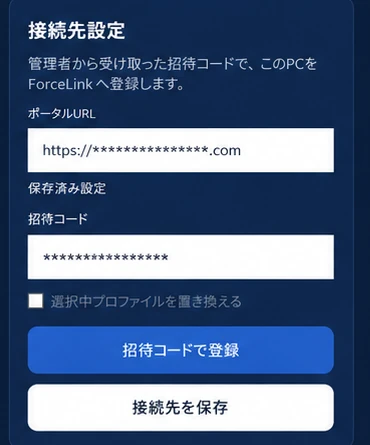
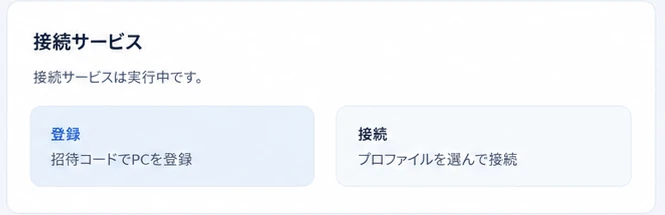

* Screenshots of the actual admin dashboard and client app (some information masked). The product interface is currently Japanese-first.
A good fit for organizations like these.
Starting remote work safely
Challenge: accounting and administrative staff need to access bookkeeping software and internal files from home, but there's no secure way to connect.
Connect securely from a home PC to internal files and business systems — remote work can start without disruption.
Branch offices and field staff accessing head office
Challenge: staff at branch offices, remote locations, or in the field need to use head-office systems, but have no secure way to connect.
Install a ForceLink BOX at head office; staff connect via the client app. No major infrastructure work required.
No dedicated IT staff
Challenge: no one with networking or security expertise on staff, so VPN deployment has seemed out of reach.
Forcenet handles the complex initial setup. A manager or general-affairs staff member can run day-to-day operations — just place and distribute.
Sales team accessing documents on the road
Challenge: reps need to view quotes and internal materials while out of the office, but emailing files feels risky.
Connect via the client app and access the latest internal documents securely from anywhere — no attachments needed.
* Illustrative scenarios, not real customer case studies.
Honest answers to common questions.
Let's talk — no pressure, no obligation.
Consultations and estimates are free. Whether you're at the "I wonder if this works for us" stage or ready to move forward, reach out through the contact form. We welcome inquiries in English by email.